
RIP Software & 9-Color Printing: Mastering Expanded Gamut
Unlock vibrant color with your 9-color DTF system. Learn how custom RIP configuration, ICC profiling, and ink management maximize your expanded gamut output.
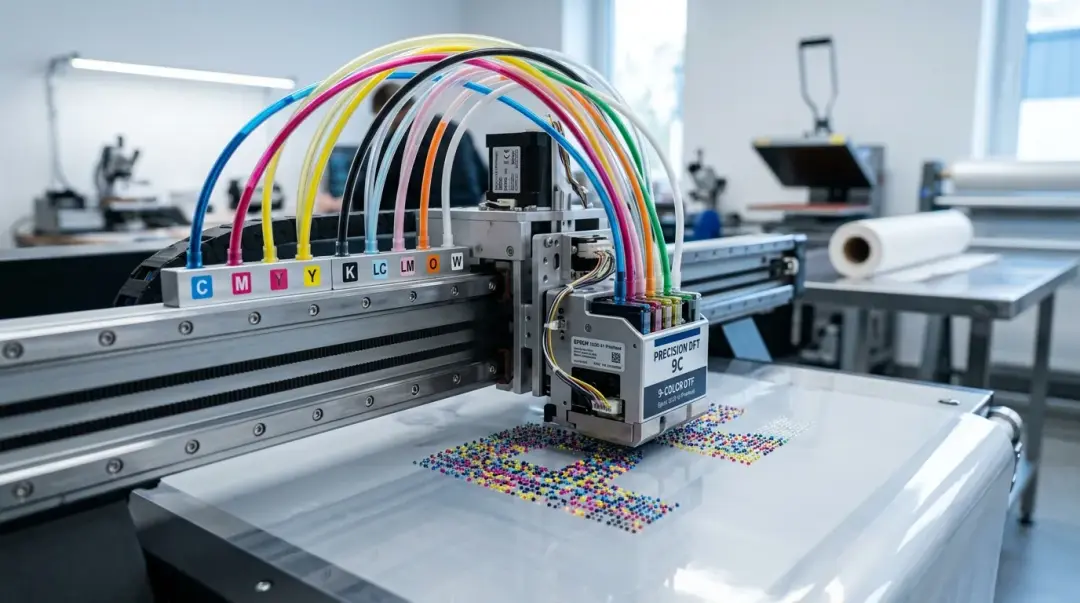
Unlocking the Power of 9-Color DTF Systems
Running a 9-color DTF (Direct to Film) setup without properly configured RIP (Raster Image Processor) software or printer accessories section is akin to fueling a high-performance engine with the wrong grade of fuel. The hardware capability is undeniable, but your output will fail to reflect that potential. Standard RIP configurations optimized for traditional CMYK+W workflows simply cannot automatically exploit the additional orange, red, green, and blue channels of a 9-color system.
To achieve true expanded gamut performance, you must move beyond factory-default settings. Achieving professional color fidelity requires custom-tailored ICC profiles, precise ink limit management per channel, and a recalibrated approach to white ink density that respects the demands of a wider color space.
The Critical Role of RIP Configuration
The RIP software acts as the translator between your digital art files and the physical printer. In a 9-color ecosystem, the RIP must manage a significantly more complex data stream. If your RIP is configured for CMYK, it will ignore the extra channels entirely, treating the file as a four-color process and wasting the costly expanded inks in your machine.
Why Standard Profiles Fail
Most 9-color DTF printer manufacturers provide a "starter" ICC profile. While useful for initial testing, these generic profiles are not optimized for your specific environment. They are typically created under idealized conditions that rarely match your shop’s unique variables, such as:
- Ambient humidity and temperature: These factors drastically alter how ink hits the PET film.
- Film Brand: Different film coatings absorb ink at varying rates.
- Ink Batch Consistency: Minor variations between ink lots can cause subtle color shifts.
The Power of Custom Profiling
Experienced operators report significant color accuracy improvements by building custom profiles using a spectrophotometer and professional profiling applications like i1Profiler or ColorThink. These tools measure your specific printer's actual output, generating a profile that precisely characterizes the interaction between your specific expanded ink set, the film substrate, and current hardware performance.
Practical Payoffs of Expanded Gamut Printing
A properly calibrated 9-color RIP configuration is most visible in three critical areas that traditionally plague 5-channel setups:
| Feature | CMYK (5-Channel) Result | 9-Color Expanded Result |
|---|---|---|
| Neon/Fluorescent Hues | Dull or muted | Vibrant and true-to-life |
| Skin Tone Gradients | Visible banding/stepping | Smooth, photorealistic transitions |
| Brand/Pantone Colors | Systematically undersaturated | Pantone-close fidelity |
1. Neon and Fluorescent Saturation
Standard CMYK struggles to replicate the luminosity of neon. By leveraging dedicated neon, orange, or green channels, you can hit saturation levels that were previously unreachable. This is vital for fashion brands that demand eye-catching, high-visibility apparel.
2. Photorealistic Portraits
Skin tones are notoriously difficult to reproduce. In a 9-color system, the additional light channels produce subtle transitions that eliminate the "stepping" or banding effects common in standard CMYK prints, allowing for high-end, gallery-quality photo printing.
3. Pantone-Specified Brand Colors
For corporate clients, color consistency is the highest priority. A 9-color system allows you to accurately hit the orange-red-green range of the Pantone color bridge—colors that CMYK systematically undersaturates. This capability is a significant competitive differentiator.
Competitive Advantage and Profitability
For shops offering premium gang sheets, the ability to guarantee Pantone-close color fidelity on vibrant hues justifies a price premium of 15–25% over standard CMYK services. Investing the time to calibrate your RIP software pays for itself quickly, particularly when working with high-end event merchandise and corporate clients where color consistency is the foundation of a long-term, profitable business relationship.
Key Takeaway: Don't settle for factory presets. By utilizing custom ICC profiling and optimizing ink limits for your 9-color setup, you convert your machine from a commodity printer into a premium production powerhouse capable of capturing market segments that standard DTF shops cannot reach.
Frequently Asked Questions
Why can't I just use standard CMYK settings with my new 9-color DTF printer?
Why are the factory-provided ICC profiles insufficient for my DTF shop?
How do I achieve professional color fidelity with a 9-color DTF system?
What are the practical advantages of 9-color DTF printing over 5-channel systems?
Is the extra investment for a 9-color DTF setup worth it for my business?
Comments
No comments yet. Be the first to share your thoughts!