
How to Create Distressed Vintage DTF Prints
Learn how to achieve a vintage, distressed look with DTF transfers using halftoning techniques and adjusted white underbase opacity for a soft, worn-in feel.
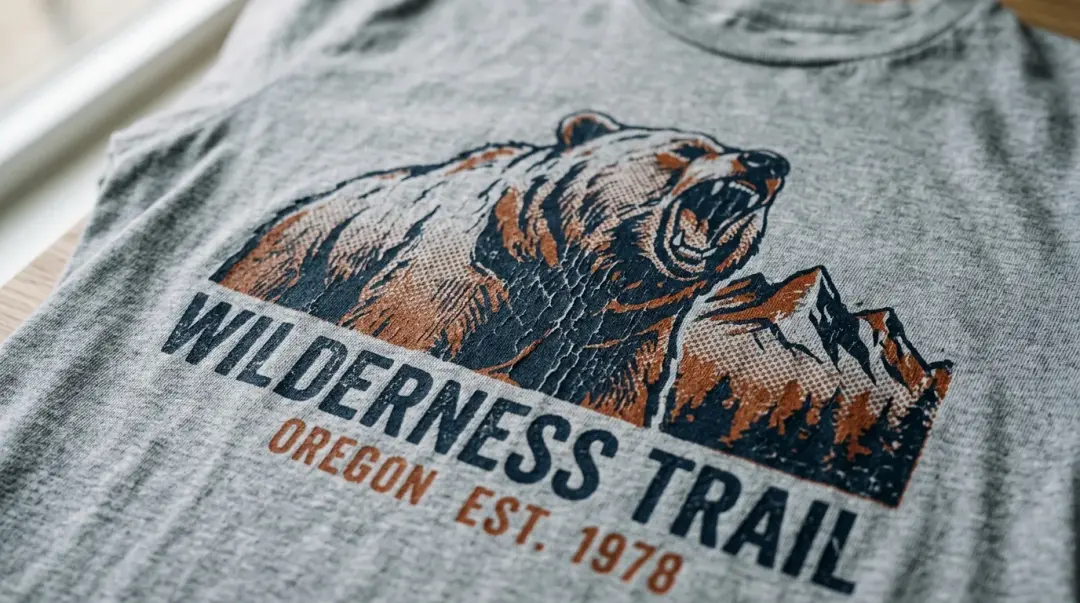
Mastering the Vintage Aesthetic in DTF Printing
Direct to Film (DTF) printing is renowned for its ability to produce vibrant, solid-color graphics. However, the modern apparel market increasingly demands a soft-hand, vintage-inspired look. Achieving this distressed vintage look with DTF transfers requires moving away from heavy, opaque designs and embracing creative digital techniques during the file preparation phase.
By leveraging halftoning and strategic underbase manipulation, you can transform your DTF prints from rigid decals into sophisticated, worn-in graphics that rival traditional screen printing.
The Core Technique: Halftoning for Texture
The secret to a successful distressed DTF print lies in halftoning. Instead of printing solid color fills, halftoning breaks down your design into a pattern of small dots or varied textures. This technique allows the underlying color of the garment to show through the gaps, creating the illusion of a faded, vintage print.
How to Apply Texture Before Printing
This effect must be generated in your design software—Photoshop, Illustrator, or other graphic design tools—before sending the file to your RIP software. There are two primary ways to approach this:
- Halftone Filters: Use built-in halftone filters to convert solid areas into variable-sized dots. This creates a classic “retro” newspaper or screen print effect.
- Distressed Overlays: Apply grunge, cracked paint, or weathered paper textures as a mask or overlay. These PNG files act as a stencil, removing ink from specific areas to simulate age and wear.
Key Takeaway: Creating a distressed look is a design-side process. By using halftones or grunge overlays, you ensure the garment fabric integrates with the artwork, preventing that heavy, plastic-like feel of a full-coverage print.
Optimizing White Underbase Opacity
On standard DTF prints, a 100% white underbase is used to make CMYK colors pop against dark fabric. However, for a vintage effect, a solid white block can be detrimental to the “worn” look. Reducing the white underbase opacity is the second critical lever for achieving a soft, aged appearance.
Why Adjust the Underbase?
By lowering the opacity or removing the white ink entirely in the distressed areas, the fabric color blends naturally into the artwork. This creates a seamless integration where the design appears dyed into the cotton rather than sitting on top of it. There is no “one-size-fits-all” setting; the ideal opacity depends on:
- Your specific printer model
- RIP software configurations
- The color and weight of the target fabric
- The desired intensity of the “faded” effect
Comparison: Standard vs. Vintage DTF Printing
| Feature | Standard DTF Print | Vintage Distressed DTF |
|---|---|---|
| Design Style | Solid, Opaque | Halftone/Textured |
| Underbase | 100% White | Reduced/Variable |
| Hand Feel | Heavier/Firm | Soft/Breathable |
| Ink Usage | High | Low |
Practical Benefits and Testing
Beyond aesthetics, there is a practical advantage to these techniques. Distressed designs use less ink, which directly correlates to a significantly softer hand feel. This is essential for premium fashion tees where customer comfort is a priority.
Pro-Tips for Success
- Desaturate Your Colors: Bright, fully saturated colors often look out of place on a “worn-in” design. Use muted tones to enhance the vintage feel.
- Test Before Production: The same file will look different on a black shirt versus a navy or grey shirt. Always run a test on scrap fabric to verify how the halftone density interacts with the fabric weave.
- Maintain Consistency: Once you dial in your preferred halftone dot size and underbase percentage for a specific style, save your settings in your RIP software as a reusable profile.
By treating the underbase and texture as variables to be dialed in rather than fixed rules, you can consistently produce unique, high-value vintage apparel that stands out in a competitive market.
Frequently Asked Questions
What is the best way to achieve a vintage, distressed look with DTF prints?
Why should I adjust the white underbase for vintage-style DTF prints?
How do halftone filters improve the durability and feel of my DTF prints?
Do distressed vintage DTF prints save money on ink usage?
What should I test before running a full production of vintage-style DTF prints?
Comments
No comments yet. Be the first to share your thoughts!