
White Ink Problems in DTF Printing: Causes and Fixes
Struggling with white ink in DTF printing? Learn the leading causes of clogging and pigment separation, and discover essential maintenance fixes for print success.
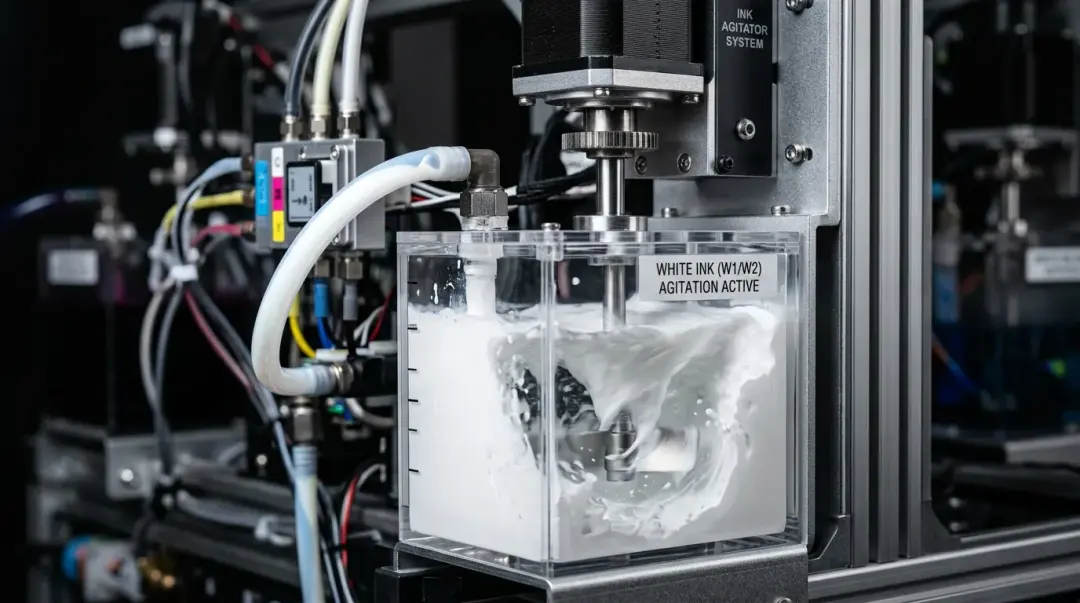
In the world of Direct to Film (DTF) printing, white ink is widely considered the most maintenance-intensive component of the entire system. For both novices and seasoned shop owners, it serves as the primary culprit behind white ink DTF problems and fixes and equipment downtime. Understanding why white ink requires special attention is the first step toward achieving consistent, professional-grade prints on dark fabrics.
Why White Ink Causes Printing Issues
Unlike CMYK (Cyan, Magenta, Yellow, Black) inks, white ink is chemically unique due to its primary pigment: titanium dioxide. This compound is highly dense and heavy compared to standard dye-based or other pigment-based inks. Because of this high density, the pigment tends to settle and separate from its liquid carrier very quickly—often within just a few hours of inactivity.
When this separation occurs, the following issues frequently arise:
- Printhead Clogging: Settled pigment turns into a paste that obstructs delicate nozzle paths.
- Uneven Whiteness: A lack of proper pigment suspension leads to patchy, inconsistent underbase coverage.
- Gray Output: Instead of a vibrant, opaque white, you may end up with a dull, semi-transparent gray result on dark garments.
- Channel Blockage: In severe cases of neglect, the entire white ink flow system can become permanently blocked, requiring costly printhead replacements.
Essential Daily Maintenance Routine
The fix for these issues is straightforward but demands strict operational discipline. Implementing a daily workflow is the most effective way to protect your investment.
Daily Best Practices
- Shake the Ink: Manually shake white ink cartridges or tanks at least once per day to re-suspend the titanium dioxide particles.
- Pre-Print Circulation: Run a short purge or white ink circulation cycle before you start your daily production session to ensure fresh, well-mixed ink is loaded in the lines.
- Consistent Usage: Never leave your machine sitting idle for more than two to three days. If you do not intend to print, you must take proactive measures to prevent the ink from drying.
Key Takeaway: For shops that operate on an intermittent schedule, flushing the white ink channels with a dedicated cleaning solution during extended downtime is the safest method to prevent permanent printhead damage.
Troubleshooting Quality Issues
If you notice your white underbase looks patchy or the output is not sufficiently white, your maintenance routine might be sound, but your settings or supplies may need adjustment.
| Issue | Potential Fix |
|---|---|
| Gray/Patchy White Output | Increase white ink density settings in your RIP software. |
| Dark Fabric Coverage | Consider printing a double-pass white underbase. |
| Frequent Clogging | Switch to higher-quality, manufacturer-recommended inks. |
The Role of Ink Quality
Not all DTF inks are created equal. Low-grade white inks often suffer from poor pigment suspension, which makes them prone to separating even with diligent maintenance. By using inks specifically designed by your printer manufacturer or a supplier with a proven track record of compatibility, you effectively eliminate a major variable from your troubleshooting process. Always prioritize quality to ensure longevity and consistency.
Summary of Fixes
Maintaining white ink is a balance of chemistry and discipline. By keeping the pigments in motion through daily shaking, ensuring the lines are purged before use, and utilizing high-quality ink supplies, you can avoid the most common pitfalls of the DTF printing process. If issues persist, adjust your RIP software density settings and monitor your environment to ensure your printer remains in top working condition.
Frequently Asked Questions
Why is white ink in DTF printing more maintenance-intensive than CMYK inks?
What is the recommended daily maintenance routine to prevent white ink clogs?
My white prints look dull and gray on dark shirts. How can I improve the opacity?
How can I prevent damage to my printer during periods of inactivity?
Does the brand of DTF ink affect printer performance?
Comments
No comments yet. Be the first to share your thoughts!