
Automate DTF Order Intake: Guide for Shopify Stores
Stop wasting time on manual DTF order intake. Learn how to use Shopify apps and automated forms to streamline file uploads and boost shop efficiency today.
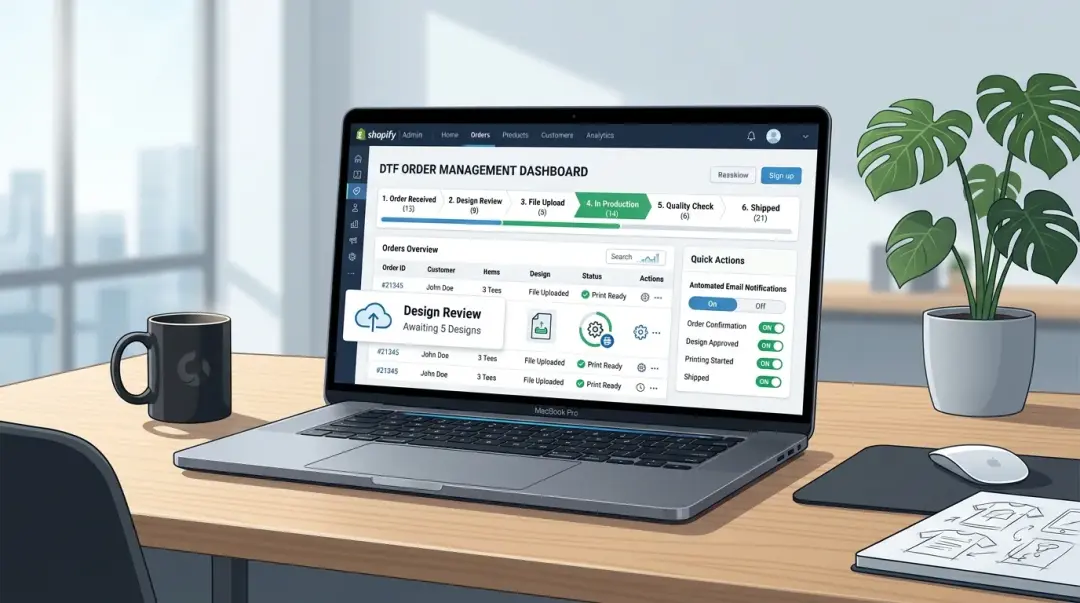
Manual order intake—collecting design files via email or DM, manually logging order details, and chasing customers for missing requirements—is the silent killer of profitability in the Direct to Film (DTF) industry. For many small shops, this administrative burden consumes 1–2 hours every single day. If you are processing 50–100 orders daily, that is time stolen from production, customer service, and scaling your business.
The Hidden Cost of Manual Order Processing
Many shop owners normalize the chaos of receiving files through scattered channels. However, this fragmented approach creates significant bottlenecks. When files arrive outside of the checkout process, production pauses while you wait for customer responses, file corrections, or size clarifications. By automating your DTF order intake with Shopify-integrated tools, you can eliminate approximately 80% of the back-and-forth communication that hinders growth.
The Essential DTF Automation Stack
To move from a reactive to a proactive production model, focus on implementing these three core tools in your Shopify ecosystem:
- Shopify File Upload App: Tools like Uploadery or FileFlare allow customers to upload high-quality PNGs directly during the checkout process.
- Post-Purchase Automation: Use Shopify's native email flows or apps like Klaviyo to instantly send pressing instructions and file format requirements the moment an order is placed.
- Production Management System: Platforms such as Printavo, Airtable, or custom Notion templates provide a centralized hub to track status (file received, in production, ready to ship) without manual data entry.
Why File Upload at Checkout is Your #1 Priority
The most impactful change you can make is requiring the file upload at checkout. This single step eliminates the 'I'll send the file after I order' behavior that ruins production scheduling. When the file is tied directly to the order, you can perform immediate pre-production file reviews. If a file is low resolution or improperly formatted, you can flag it for the customer immediately, resulting in faster issue resolution and significantly shorter overall production lead times. If you have questions about this, check our FAQs Page — 'How do I submit my order and files?' or order process section for more details.
| Feature | Manual Process | Automated Process |
|---|---|---|
| File Collection | Email/DM (Slow/Scattered) | At Checkout (Instant/Linked) |
| File Review | After Payment | Pre-Production/Automated |
| Efficiency | Low (High Admin Drain) | High (Scalable) |
Capturing Specific Requirements
For shops offering gang sheet building, your intake form must be robust. Ensure you capture the customer's intended final print size alongside the file upload. Ambiguity in sizing is responsible for a disproportionate share of production errors. By standardizing this data input, you prevent costly reprints and wasted film.
How to Scale Your Operations Sequentially
Do not attempt to overhaul your entire workflow in one day. Use this sequential rollout plan to minimize disruption:
- Phase 1: Checkout Integration: Install an upload app and enforce file submission at checkout.
- Phase 2: Email Automation: Implement post-purchase flows that automatically send technical guides and support documentation.
- Phase 3: Production Mapping: Connect your Shopify data to a management tool (like Airtable) to track order stages automatically.
Key Takeaway: Automating your intake process is the difference between running a "side hustle" and operating a professional print shop. Each step of the automation stack reduces manual work, creating a foundation that can support 2–3x your current volume without adding a single administrative staff member.
Frequently Asked Questions
Why is manual order intake considered a bottleneck for DTF shops?
How does integrating a file upload app at checkout improve DTF production efficiency?
What information should I capture in my DTF order intake form to reduce errors?
What tools are recommended for a basic DTF automation stack in Shopify?
What is the recommended sequential plan for automating a DTF shop?
Comments
No comments yet. Be the first to share your thoughts!