
What Is RIP Software and Why Every DTF Printer Needs It
Discover why RIP software is the essential bridge between your designs and DTF printer. Learn how it manages white ink, color accuracy, and costs for professional output.
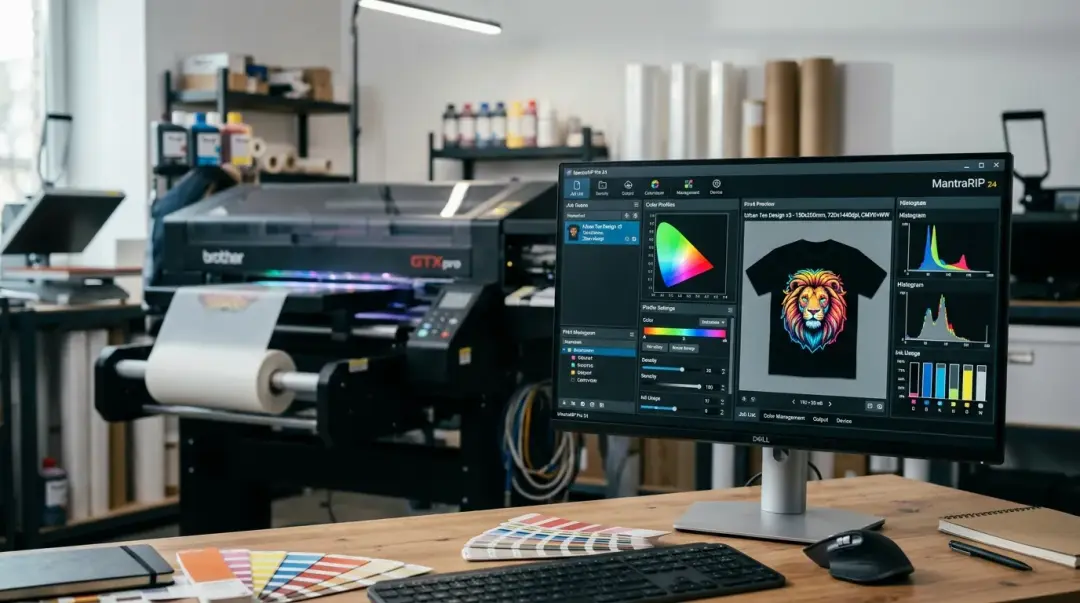
In the world of Direct to Film (DTF) printing, achieving professional, vibrant, and durable transfers is not just about having a high-quality printer—it is about the intelligence behind it. Enter RIP software for DTF printing, the critical link between your digital artwork and your physical printer. Without a dedicated RIP, your DTF printer lacks the instructions necessary to manage complex color channels, white ink layering, and ink density, often leading to inconsistent results that can sabotage your business.
What Is RIP Software?
At its core, a Raster Image Processor (RIP) is software that translates your graphic design files (such as PNG, TIFF, or PSD) into a format your printer can actually understand: raw, precise pixel data. While standard printer drivers are designed for basic office documents, DTF printing requires a sophisticated workflow that manages multiple ink channels, specifically the CMYK + White configuration.
Key Takeaway: RIP software acts as the “brain” of your printing operation. It processes your artwork into printable layers, ensuring your design is formatted correctly for film, including the critical white underbase.
Why Your DTF Printer Cannot Function Without It
If you have ever wondered why your prints look dull, suffer from white ink bleed, or have inconsistent colors, the culprit is often a lack of proper RIP control. Here is why it is non-negotiable for DTF:
1. Precise White Ink Underbase Management
In DTF printing, the white ink layer is the foundation of the print. It sits between the transfer film and the colors, providing opacity on dark or colored fabrics. A RIP allows you to adjust the white ink density, create custom choke (the thinning of the white layer so it doesn't peek out from under the color), and determine exactly where the white ink should be applied.
2. Professional Color Accuracy via ICC Profiles
What you see on your monitor is not always what you get on film. RIP software uses ICC (International Color Consortium) color profiles to map the colors in your file to the specific gamut of your printer-ink-film combination. This ensures that the \"brand blue\" in your logo prints exactly as intended, every single time.
3. Cost Optimization and Ink Saturation
White ink is the most expensive component of your print run. According to industry estimates, white ink alone can account for 40–50% of material costs on dense or full-color designs. RIP software allows you to limit the percentage of white ink applied to specific areas, significantly reducing waste without compromising print opacity or wash durability.
Comparison of Basic vs. Advanced RIP Features
| FeatureBasic Driver/Bundled RIPProfessional/Third-Party RIP | ||
| White Ink Control | Minimal/Automated | Full granular control (choke/density) |
| Color Profiling | Limited | Advanced ICC Profile Support |
| Nesting/Layout | Basic | High-efficiency automated nesting |
| Ink Cost Control | Low control | Precise channel-by-channel adjustment |
Troubleshooting Common DTF Issues
Before you ever touch your printer’s hardware when facing problems, check your RIP settings first. Many of the most common issues are software-related:
- Color Inconsistencies: Often resolved by re-loading or calibrating your ICC profiles.
- Ghosting or White Ink Bleed: Usually caused by incorrect “choke” settings, where the white layer is slightly larger than the color layer.
- Banding: Can sometimes be mitigated by adjusting the droplet size or print resolution within the RIP settings.
Conclusion: Invest in Your Workflow
While some entry-level DTF machines come bundled with starter RIP software like Maintop, experienced operators quickly realize that upgrading to professional-grade third-party solutions provides greater control and faster workflows. Whether you are dealing with nesting, last-minute layout adjustments, or fine-tuning ink density, a professional RIP is the single most important investment you can make to ensure your prints remain professional-grade.
Frequently Asked Questions
What exactly does RIP software do in the DTF printing process?
Why is it important to control the white ink underbase in DTF printing?
Can I use standard printer drivers instead of dedicated RIP software?
How does RIP software help reduce DTF ink costs?
If my DTF prints look dull or have color issues, should I check my hardware or my software?
Comments
No comments yet. Be the first to share your thoughts!